
About Virtual Driving School (Build 23368223) PC Game
Virtual Driving School Steam Download For PC with Torrent Links. Visit NexusGames for online multiplayer games and gameplay with latest updates full version – Free Steam Games Giveaway.
Virtual Driving School Direct Download
Stop wasting paid lesson time on the basics. Virtual Driving School is a serious, skills-first simulator that teaches real-world manoeuvres and traffic systems, so you show up to your first lesson already road-ready. Drill fundamentals in quick 1–3 minute scenarios, then put them to use in practice drives, quizzes, and career modes like delivery driver, and repeat until it sticks. Then test your skills on city streets, rural roads, and motorways, in sun, rain, or fog. Crashout Crew
VDS is built to get you ahead fast: fewer hours on fundamentals, more time perfecting your driving.
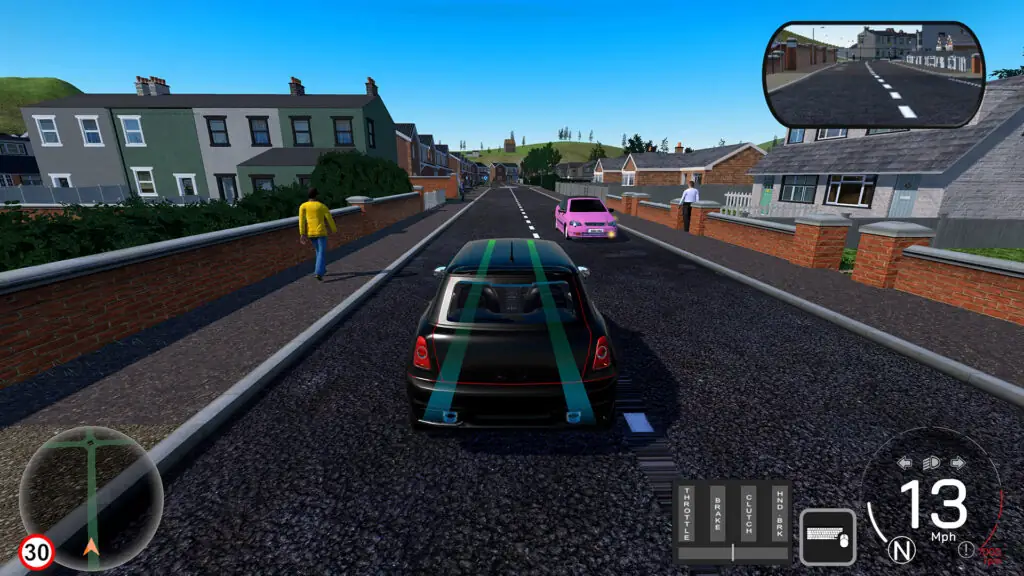
Why you’ll learn faster (and spend less)
-
Targeted lessons cover the fundamentals in short bursts (1–3 mins): Gears, clutch control, moving off, lane choice, merges, roundabouts, parking, emergency stops, and more.
-
Practice Drives: Tackle set routes packed with live hazards — pedestrians, parked obstacles, unpredictable traffic — with one goal: get to the end cleanly.
-
Quizzes: Drive and think. Routes pause to test your road knowledge with progressively harder questions and a final score at the end.
-
Career Modes: Step into the shoes of a delivery driver (points-based) or taxi driver (5-star rating). Hit your destinations on time, drive cleanly, and watch your score climb — or tank.
-
Unlimited retries: Master tricky manoeuvres without a meter running.
-
Realistic traffic & signage: Pedestrians, temporary roadworks, box junctions, crossings, level crossings, lane control, motorway incidents, different times of day.
-
Hazard Avoidance: Train for the unexpected — cars pulling out from behind lorries, reckless overtakes, sudden stops, dangerous drivers, and more.
-
Right‑ and Left‑Hand Drive options (mirrors, lane flow, junction priority, etc.).
VR and Multi Display Support
-
Full VR Support – Play the game in Full VR.
-
Multi Display and Surround Display Support – combine up to five displays to create the most immersive gaming environment possible. (Requires NVIDIA Surround).
-
Multiple Cameras – cameras and display cut-ins show the view from multiple sources simultaneously: allowing the player to view a head, behind, wing mirrors, rearview mirror(s) and side windows.

-
Headtracking Support – Headtracking combined with surround screens allows near VR experience with multiple screens.
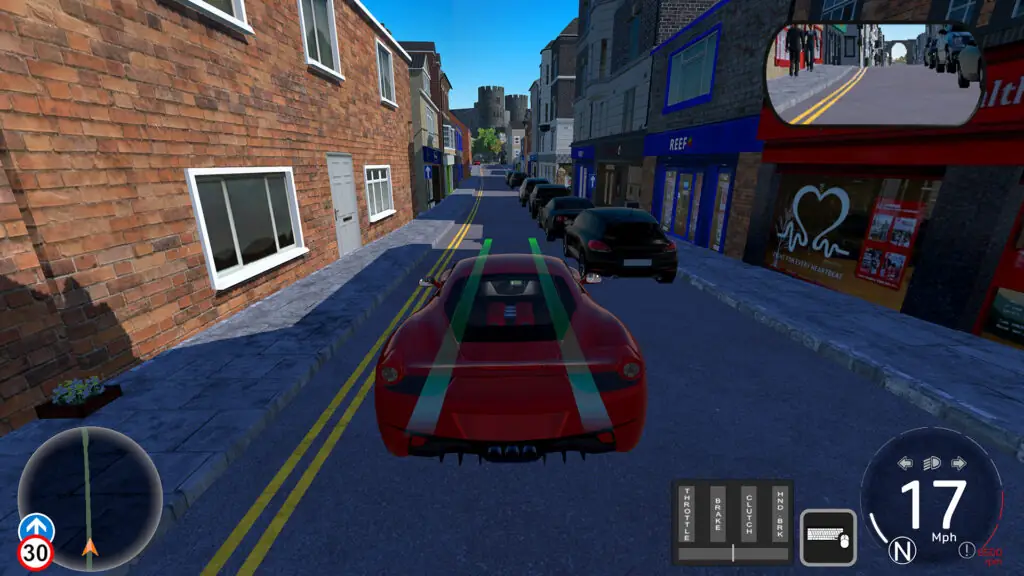
The syllabus
Over 30 lessons covering all aspects of driving broken down into several categories.
-
Basics: Setup, controls, gears, moving off, turning, pull up left/right, blind bends, hill starts.
-
Traffic Systems: Traffic lights, zebra/controlled crossings, box junctions, junctions, priority rules, roundabouts.
-
Speed, Stopping & Parking: 20 mph zones, dual carriageways, national limits
World & handling
-
HD environments with pedestrians and dense traffic with realistic driving AI.
-
Locations: Launch regions include Conway, Cairnloch, and San Jose, with locations from around the world rolling out (UK, US, Europe, Asia).
-
Dynamic conditions: Day/night, rain/fog, wet/icy grip that changes stopping distances.
-
Vehicle variety: From compact cars and family sedans to vans. Each with distinct visibility, weight, and braking feel.
How to Download & Install Virtual Driving School On Steam
- Click the Download button below and you should be redirected to a Download Page, Datanode, Qiwi, GoFile, PixelDrain.
- Wait 5 seconds and click on the blue ‘download now’ button in DataNode. Now let the download begin and wait for it to finish.
- After Virtual Driving School is done downloading, right click the .zip/.rar file and click on “Extract to Virtual Driving School” (You must have Winrar/winZip installed on your PC).
- Now open the extracted folder of Virtual Driving School and launch the game by running the .exe of the game.
- Have fun and play! Make sure to run the game as administrator and if you get any missing dll errors, look for a Redist or _CommonRedist folder and install all the programs in the folder.
Virtual Driving School System Requirements
- OS *:
Windows 7/8/10
- Processor:
Intel i3-6100/Ryzen 3 3200G
- Memory:
8 GB RAM
- Graphics:
NVIDIA GTX960 / AMD R9 380
- DirectX:
Version 11
- Storage:
4 GB available space
- VR Support:
SteamVR or OpenXR
- OS:
Windows 10
- Processor:
Intel i5-8600K / AMD Ryzen 5 3600
- Memory:
8 GB RAM
- Graphics:
NVIDIA GTX1060 / AMD RX 570
- DirectX:
Version 11
- Storage:
4 MB available space
- OS:
OSX 10.8+
- Processor:
2.0Ghz Dual Core, or better
- Memory:
4 GB RAM
- Graphics:
Any
- Storage:
2 GB available space
- OS:
OSX 10.8+
- Processor:
2.0Ghz Dual Core, or better
- Memory:
8 GB RAM
- Graphics:
Good 3D Card
- Storage:
2 GB available space
- OS:
Ubuntu 20.04, Ubuntu 18.04, and CentOS 7
- Processor:
x64 architecture with SSE2 instruction set support.
- OS:
Ubuntu 20.04, Ubuntu 18.04, and CentOS 7
- Processor:
x64 architecture with SSE2 instruction set support.
More Like This
Build 25000235
- 13.49$
v1.0

- 3.39$
v0.31.5
- 12.74$
